
noHuman Team 4.4: charts, diagrams and forms in your noHumans' replies
In noHuman Team 4.4, noHumans answer with diagrams, bar or pie charts, progress bars and forms you fill in, on your computer or phone. Telegram gets plain text.

Published
In noHuman Team 4.4, a noHuman can answer you with a picture instead of paragraphs of numbers. Its chat reply can hold a diagram, a bar, line, area or pie chart, number tiles, progress bars, or a form you fill in and send back. The app draws them on your computer and in the mobile companion.
Status: new in noHuman Team 4.4.0, released on 25 October 2026. The Mac installers come first, and the Windows 10/11 installer follows.
Install 4.4.0, read what's new in 4.4.0 or see the release notes on GitHub. The 4.4 roundup covers the rest of the release.
What can a noHuman show in a chat reply?
It can show three kinds of block: diagrams, charts and forms. The noHuman writes each one as a fenced block of text in its reply, and the app draws it in place. The app reads a block as data, and nothing in it runs as code.
- Diagrams: flowcharts, org charts, sequence diagrams, timelines, Gantt charts, mind maps and more, drawn with Mermaid in a card that follows light or dark mode. A button in the corner enlarges the diagram.
- Charts: bar, line and area charts with up to 8 data series (stacked, or with horizontal bars), pie charts of up to 8 slices, up to 8 number tiles with a change and a trend arrow, and up to 20 progress bars. Hover for a value, or open Show the numbers for the full table.
- Forms: up to 12 controls, chosen from sliders, number fields, single or multiple choice, switches and text fields, with one button that sends your answer.
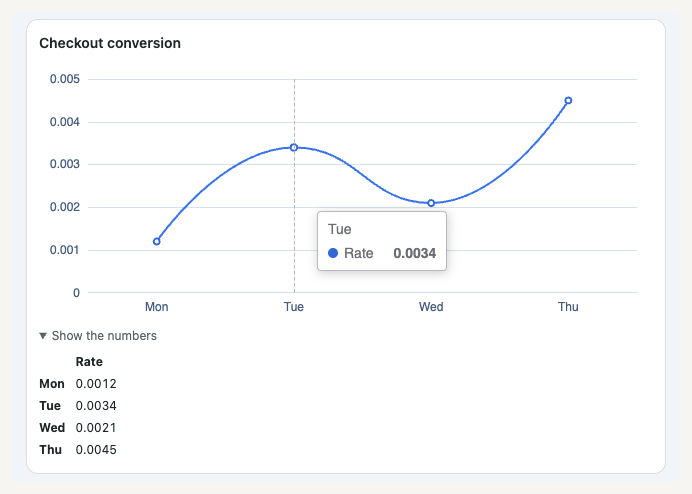
A line chart in the 4.4 desktop chat: test conversation, sample numbers.
Progress bars suit work that runs for days, such as a content pipeline. Ask your marketer how this week's posting is going, and its reply can hold one bar per platform: YouTube Shorts at 5 / 7 posts (71%), Instagram Reels at 3 / 7 posts (43%) with a note that 4 are queued, and TikTok at 7 / 7 posts (100%) with a tick and a green bar.
How do I ask for a chart or a diagram?
Ask in plain words in the app's chat, on the computer or the phone: "show this week's posting progress as a progress chart", or "draw the team as an org chart". Name a chart, graph, plot, diagram, progress bar or anything visual, and the noHuman gets a one-turn reminder to answer with a block.
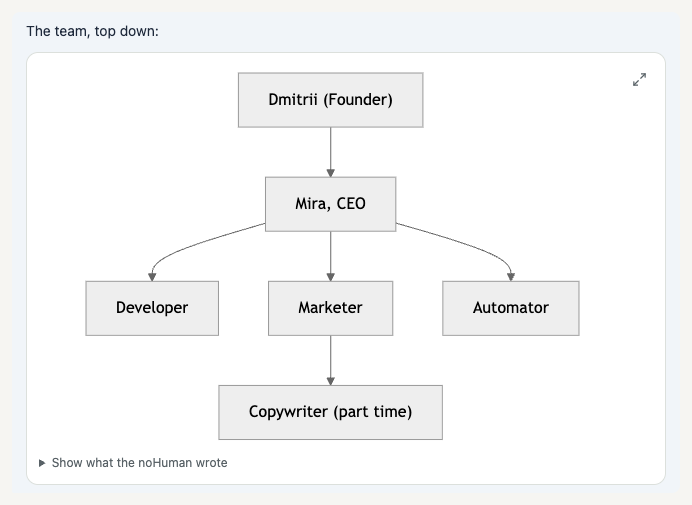
An org chart from a test conversation, with the enlarge button at the top right.
Each noHuman's instructions also include a section called Showing Things in Chat, with a working example of each block. The app writes it in when your team starts on 4.4, so you have nothing to switch on. It tells the noHuman to chart real data and keep the text around a block short.
If a reply draws bars out of text characters, the noHuman gets a correction with your next message: show bars as a chart block, which the app draws.
The reminder listens for English words, so a request in another language gets none. The section in the instructions still applies.
How do I answer a form?
Set the controls and press the form's button. The app sends your choices to the noHuman as an ordinary message from you, and the form turns into a Sent summary of your answers. The noHuman reads it the way it reads anything you type.
Say your CEO noHuman is preparing a product launch and needs four settings before it starts. Instead of four questions in a row, it sends one Launch settings form: a choice of launch day, a choice of tone, a Clip length slider from 15 to 90 seconds and an Add captions switch. You pick Thursday, Calm, 45 seconds and captions on, then press Send. The chat shows this message from you:
Form answer: Launch settings (form 45a99490)
- Launch day: Thursday
- Tone: Calm
- Clip length: 45 s
- Add captions: Yes
The id in brackets ties the answer to its form, so both the computer and the phone show it as answered. If the noHuman sends the same form again later, the new copy is open. Send waits until the noHuman finishes its current reply, and the app refuses an answer longer than 4,000 characters. A form in a message between two noHumans is read-only.
Can a form publish a post or spend money?
No. A form answer is a message from you, with no approval attached. Each noHuman's instructions keep publishing, posting, spending money, accounts, credentials and deleting out of forms. The noHuman asks about those in a question card instead, such as the approval card where you choose how long an approval lasts.
The rule is part of the instructions, and the app does not block a form that breaks it. If a form asks for a password or a payment, leave it unsent and tell the noHuman.
On the computer, Mermaid draws diagrams in strict mode, with click actions off, and the app strips links and form controls from each drawing before showing it in an isolated part of the page.
What happens when a chart or diagram does not draw?
You see the reason in place of the drawing, and Show what the noHuman wrote opens the block as the noHuman typed it. A pie chart with nine slices, for example, shows this card:
This chart could not be drawn: a pie chart shows at most 8 slices: group the smaller ones as "Other".
With your next message in the app, the noHuman gets the same reason for a broken chart or form, plus a request to fix it next time. Diagrams are the exception for now. The app does not tell the noHuman when Mermaid cannot draw one, so ask it to fix the diagram yourself.
A late drawing keeps your place in the chat, on the newest message or a search hit, until you scroll.
What do Telegram, notifications and search show?
They show readable text in place of the block. In a Telegram reply or the team's Telegram group mirror, the app sends a chart as its numbers and a form as its questions, with a note to answer in the app. The posting progress from earlier arrives in Telegram like this:
Posting this week
- YouTube Shorts: 5 / 7 posts (71%)
- TikTok: 7 / 7 posts (100%)
- Instagram Reels: 3 / 7 posts (43%)
The launch form arrives as "Form: Launch settings (answer it in the noHuman Team app)" followed by its four questions, and a diagram as "(A diagram: open the noHuman Team app to see it.)". Inside the app, chat lists, search results, Team overview, Needs you and desktop notifications show a short preview in which each block becomes a label, such as "Progress: Posting this week" or, after you reply, "Answered: Launch settings". Copy, Quote and Forward in the right-click menu take the readable version too.
For Telegram setup, see the Telegram FAQ and how to run your team from Telegram.
Does it work on the phone?
Yes. In the mobile companion, charts, number tiles and progress bars appear in the conversation with Show the numbers, and a chart too wide for the screen scrolls sideways, with the hint "Swipe sideways to see every bar." below it. A diagram appears as a card: tap it to see the diagram full screen, drawn on the phone with no internet connection.
On an iPhone, diagrams need iOS 16.4 or later. Forms work as on the computer: your answer goes out as a message, and the form locks on both devices. If an answer did not reach the computer, the form stays open on the phone with your choices still set. Replies now reach the phone at up to 24,000 characters, and the app cuts a longer reply outside any chart, form or diagram.
The companion's iOS and Android builds are prepared for store release, and it is not in the App Store or Google Play yet. See the mobile guide.
Quick answers
Do Mermaid diagrams in my Markdown files draw now?
Yes. A Mermaid diagram inside a Markdown file you open in the Library, Memory or a chat file preview draws in the same card as in chat. Before 4.4, those diagrams showed an empty box.
Can I play the videos my team made?
Yes. Video and audio now play, and you can skip through them, in Library → Work files, Library → Shared with teams and the file views of skills, plugins and tools. The chat file viewer has played media since 4.1.1. Playback depends on the file's format and codec. See chat files.
Will a noHuman make up numbers to fill a chart?
Its instructions tell it to use real data, but the app does not check the numbers against their source. Before you act on a chart, compare Show the numbers with the report or file behind it.
Where do I see progress without asking for a chart?
In the Work panel beside each chat, which lists what a noHuman is working on and what it finished. In 4.4 it also shows each task's tokens, and token use per task explains them.
For the complete chat guide, see Use the noHuman Team dashboard.
Install noHuman Team to see your team's progress, plans and choices drawn in the chat. The monthly subscription starts with a 7-day trial; payment details are required at checkout. Your AI provider charges separately.
Related posts
noHuman Team 4.3 and 4.4: approvals, Forbidden and who decides
Payments, publishing and your accounts stay your call. Approvals carry a scope and an end you choose in 4.4, and Forbidden blocks actions in all autonomy modes.
noHuman Team 4.3: setup with no terminal and overnight recovery
Set up noHuman Team on Mac or Windows with no terminal, sign in to Claude or ChatGPT once per computer, and let the app bring your team back after a long night.
noHuman Team 4.3 and 4.4: see what each noHuman did in the Work panel
Select Work beside any chat to see requests waiting for you, current tasks by project and 7 days of finished work. noHuman Team 4.4 adds tokens per task.