Active 3 min2
Request from You
You
YouReply received
Replied toYou
YouAlpha software. Expect bugs. noHuman Team runs AI workers on your own machine with real file, browser and desktop access — start on work you can afford to have go wrong, and leave the approval queue on. What is rough right now
Run a team of AI agents on your computer with noHuman Team. Give the leader a goal and let your noHumans share the work. Follow their conversations, review their files, and control spending limits and approvals.
Desktop 4.2.2 · macOS & Windows · Check available installers.
Limited test access is available without a payment card.
Requests, replies, activity and saved memory share one workspace. Select a noHuman, open a work card or explore its conversation.
One noHuman is working. Open a work card to see its conversation or recorded activity.
Recent requests and the latest replies
YouYouIn noHuman Team 4.2.2, search saved conversations and open the message you need. Keep your draft and attachments while you read older work or inspect a report, screenshot, video or audio file beside chat.
What’s new in 4.2.2Open Search beside one noHuman’s chat, or search all chats in the selected team from Team overview. Open a result at the saved message, then use Return to latest when you finish reading.
Explore saved chat searchBrowse the team's notes in Library, or open Memory for one noHuman. Review reminders and choose a knowledge library before browsing its files.
Preview supported documents and images, play browser-compatible video and audio, or download a file. Close inspection to return to Profile or your previous panel.
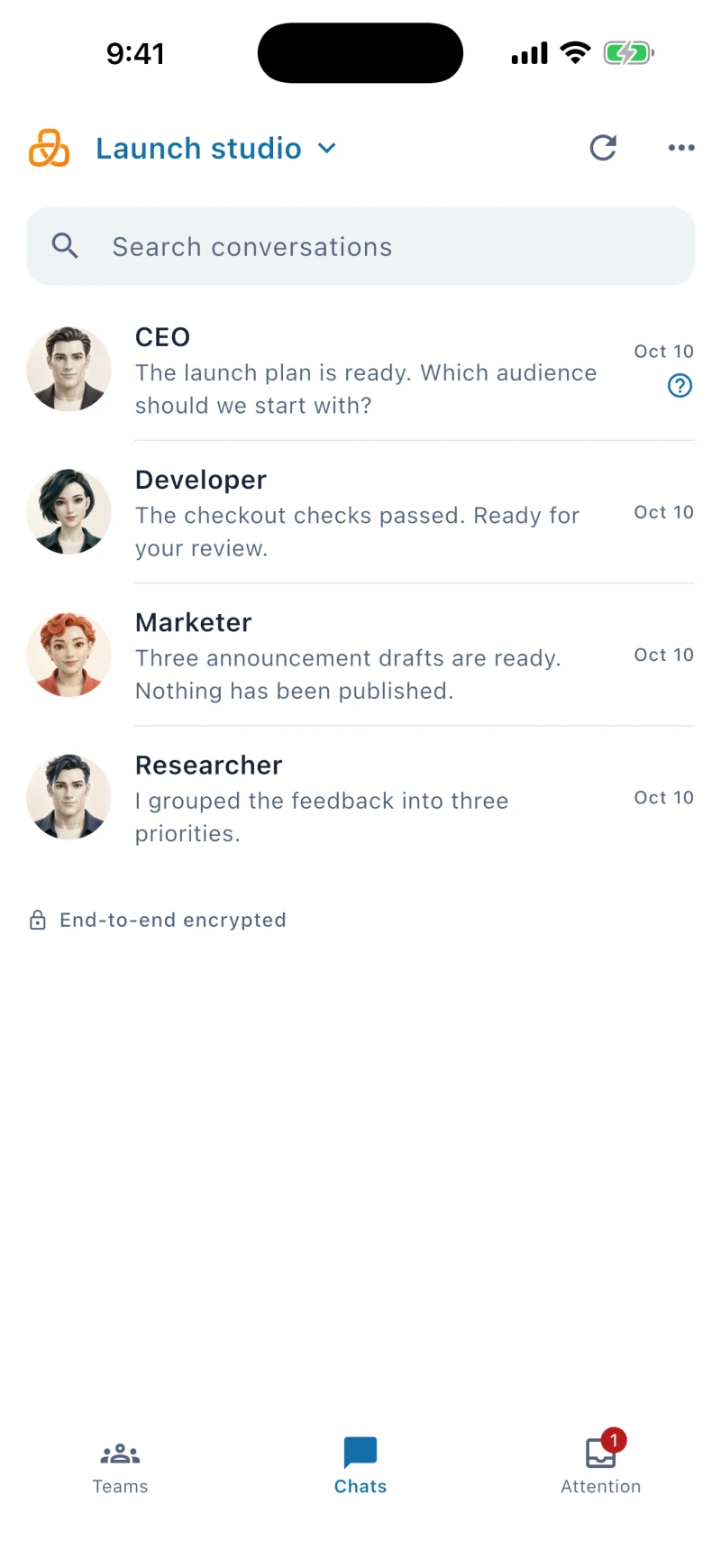
Explore chat file previewsStep away from your computer and keep in touch. The noHuman mobile companion brings your conversations and requests to iPhone and Android.
Type, dictate on your phone, or share a photo or file with your team.
Your computer runs the team and must stay on and online. Pair your phone from App settings → Mobile access.
See how pairing worksPreparing for the App Store and Google Play. Download links will appear here after publication.
Connect your AI accounts, set each worker’s responsibilities, and decide which actions need your answer.
Connect a supported Claude or ChatGPT plan, or use an API-key provider. Choose a model for each noHuman. Gateway-managed subscription connections use stand-in credentials; a connected fallback can take over when the primary provider reaches its usage limit.
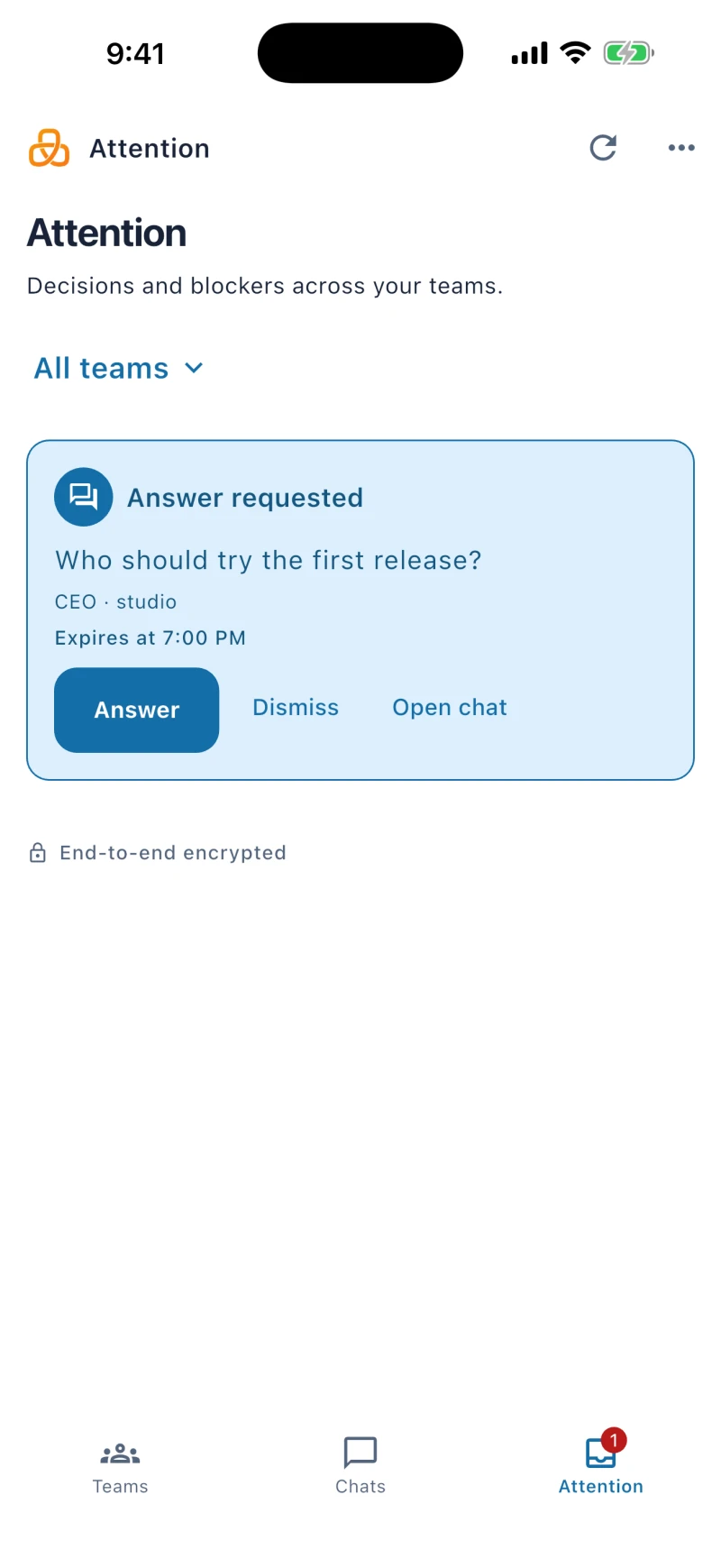
The leader gets an acknowledgement when it hands off a task. A follow-up timer nudges a quiet teammate. You can read the request and reply on Team overview without searching each chat.
Review tool permission requests, extension installs and proposed teammates in one queue. Choose each worker’s autonomy setting to control which actions ask first.
Set a daily budget and review recorded usage per worker. The app can pause new conversation turns after recorded usage reaches the limit, including work requested by teammates.
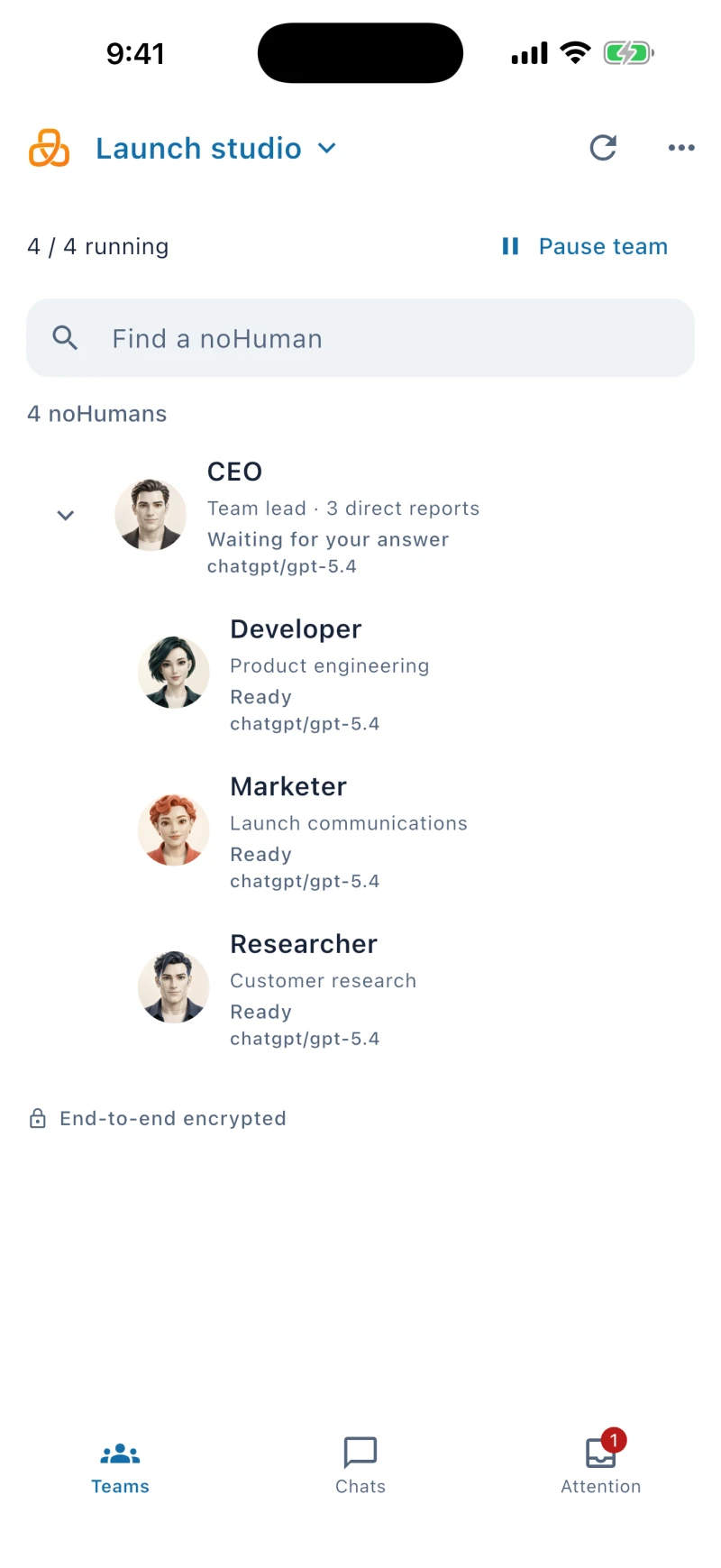
Give the leader a goal. It can hand work to a teammate, check the reply, and follow up when needed. See who asked for work and who answered on Team overview, then open a conversation for details.
One conversation. A whole team working behind it.
Send text or images to a connected noHuman, or follow team messages in your group. Your computer still hosts the team and must stay online.
Telegram setup guideChoose a template with defined responsibilities and reporting lines. Review its accounts, models, and tools before launch.
Each team keeps its own settings, history, and work folders. Change non-leader roles after setup; the leader’s role stays fixed.
Coordinate product, development, marketing, and operations.
Template structure preview
You · Founder
Give direction and answer decisions.

CEO · Leader
Set priorities, delegate, and review results.

Developer
Implement features and fix bugs.

Marketer
Draft copy and plan campaigns.

Automator
Schedule tasks and monitor systems.
Connect your AI accounts on your computer, then choose a model for each noHuman. For gateway-managed Claude and ChatGPT connections, noHumans use stand-in credentials; the local gateway adds authentication when contacting the provider.
CEODeveloperMarketerEach uses the model you choose.
Credentials stored locally
Adds provider authentication
Files your team works on together
Receives prompts and selected content. Returns the model’s answer.
Outside your computerSeparate processes and homes are not a full operating-system sandbox. Browser and desktop access depend on the noHuman’s configuration and permissions.
In the managed connection, the gateway replaces a stand-in credential for an allowed provider destination. This keeps real credentials out of the worker’s normal authentication setup; it does not remove secrets from message text or protect against all local file access.
Use Claude for one worker and ChatGPT for another. Configure a connected fallback to continue when a provider reaches its usage limit. Your providers’ plan limits and billing still apply.
Desktop workers get their own Chromium profile and can use permitted desktop controls. Your team shares a workspace folder with you. Inspect browser views, files and recorded activity in the dashboard.
Review recorded usage, set a daily budget for each worker and choose how often scheduled checks run. Manage working context and saved Memory as conversations grow.
The daily budget pauses new conversation turns when recorded usage reaches the limit. Running work and background checks can still add usage; a failed usage check allows work to continue. Check your provider’s billing for the final charge.
Compaction summarizes older conversation content to make room. Inspect Working context from Profile and keep durable decisions in saved Memory, where you can review and correct them. A summary can omit details.
Scheduled checks read saved notes and recent activity before deciding whether to wake a worker. Some checks use a model and can consume tokens even if no chat reply appears. Choose their timing in Schedule.
Choose an available installer for your computer and follow the setup wizard. noHuman Team supports macOS and Windows.
Choose an available installer for your operating system. Setup opens a native folder chooser and prepares the AI software your connection needs.
Name the team, pick a workspace folder, enter your product key, choose a template. The wizard guides each step.
Sign in to Claude or ChatGPT, add an API key for another provider, or do both. Choose a provider per worker. Gateway-managed connections use stand-in credentials.
Message the leader. Follow requests, replies and activity in the dashboard. Pair the mobile companion to keep in touch from your phone, or set up the optional Telegram mirror.
Your workers and saved work stay on your computer. You choose their AI accounts, tools and permissions.
Mix Claude, ChatGPT, Gemini, OpenRouter, DeepSeek, Mistral, Groq, Bedrock, and other providers across one team. Choose the provider and model per worker from the dashboard.
Open Memory for one worker, or filter the team’s notes in Library. Review current notes, work threads, journals, past work, reference notes and reminders in one consistent workspace.
Workers drive their own Chrome (snapshot-first, refs not guesses, file uploads without the OS dialog). Watch it live in the dashboard and take control when you need to. They can also operate the desktop for apps that have no API — fully on macOS and experimental on Windows.
A worker can build a small local application with its own backend. You approve it (bound to a hash of its files), grant it specific workers, and it can schedule work back to them.
Extend workers with skill folders (SKILL.md plus scripts and references) and shell tools. Installs go through a signed, fail-closed gate and the same approval queue.
Preview recent requests and replies on Team overview. Expand saved activity charts for AI response, tools, browser and subagent time. Recorded time helps you inspect work; it does not score results.
20
Provider integrations
macOS & Windows
Native desktop app
v4.2.2
Current release
We'd rather you read this here than discover it after an hour.
Choose an available desktop installer for 4.2.2. The setup wizard helps you choose a folder, connect your AI account and prepare any missing AI software.
A short question and a table of what Approve records, with its length in days, on the computer and the phone. Available for macOS and Windows.
Right-click to ask a noHuman about something, remember it, search for it, or quote and forward a message. The app now restarts its background service by itself when it stops answering. Available for macOS and Windows.
Questions only you can answer always reach you, approvals are recorded and checked before noHumans act, and the first message after you start the app is answered in seconds. Available for macOS and Windows.
noHuman-to-noHuman loops wait for your go-ahead while real work keeps moving, one helper model runs the Archivist and heartbeats, and leaders’ follow-ups match the work. Available for macOS and Windows.
Launch into the model-review checklist, check the initial ChatGPT model against your account, and install fewer files on Windows. Available for macOS and Windows.
Lighter packages retain runtime files, licences and agent skills. App updates explain the installation step, and setup checks supported AI software versions.
Use the native folder chooser and install missing AI software through setup, with permission, progress and retry in the app.
Fresh installations open the setup wizard. Resume with your saved team name and verified working folder, or retry a failed settings load without replacing saved data.
Search one noHuman’s chat or the selected team’s saved messages and attachment names. Open the exact result with nearby history, keep your draft, and return to the latest conversation.
Open file links, attachments and screenshots in the right-side viewer. Play supported video and audio, download files, and keep your draft and reading position.
Illustration-led headers keep titles in place as you switch sections. Personal Memory uses the noHuman selected in the sidebar; Team Library keeps its owner filter.
Conversation previews, saved activity by category, manual card ordering, upcoming reminders and the model picker beside Send.
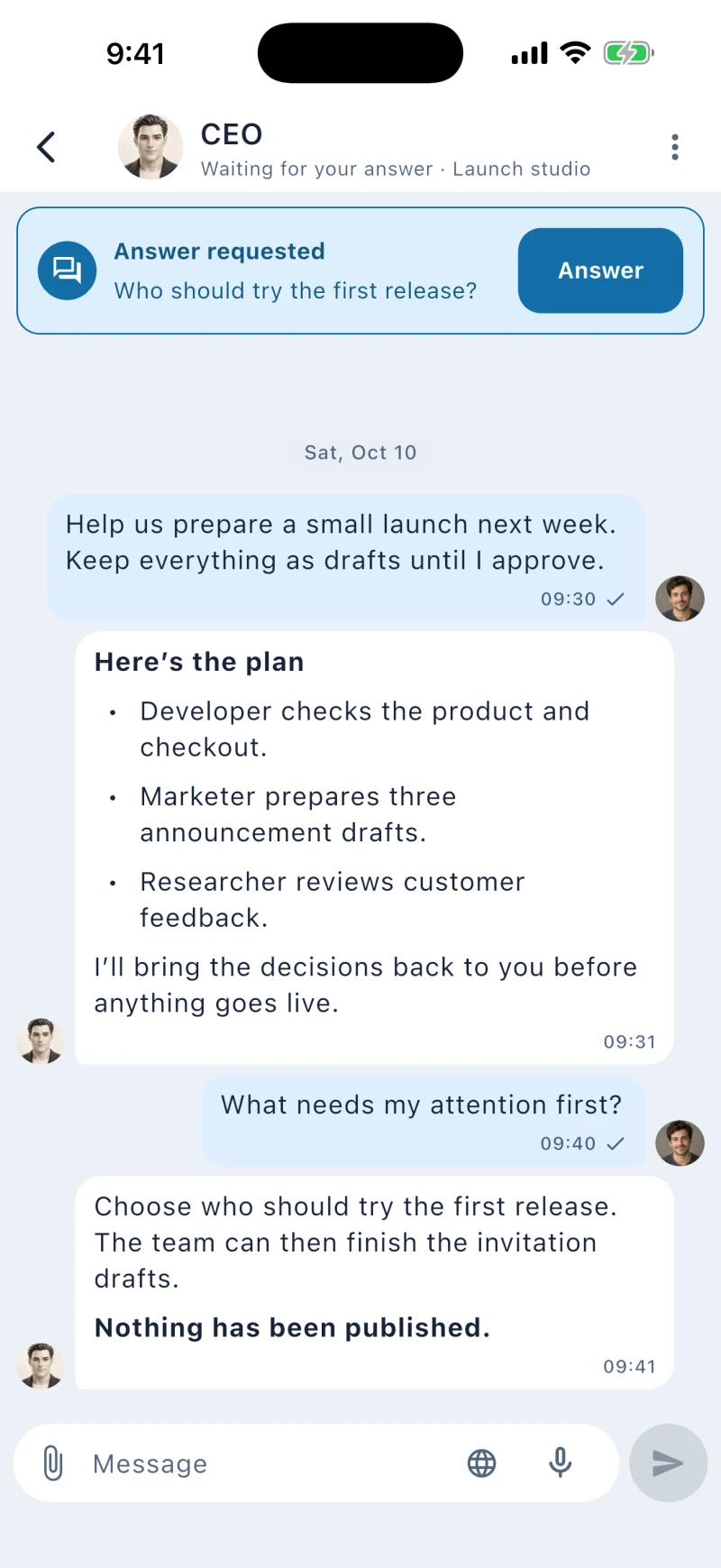
Chat, answer requests, share files and dictate messages from your phone. Pair with the computer that runs your team; the mobile app does not host the AI workers.
Choose early-adopter pricing, or request limited test access to try the app first. Your AI provider charges separately. Existing product keys keep their issued terms.